Cloud Computing
Configure Self-Service Password Reset (SSPR) for Users
SSPR allows users to change or reset their passwords without admin or help desk involvement.
To set up SSPR, you will need at least, a valid Microsoft Entra ID P1 license. An account with Global Administrator or Authentication Policy Administrator privileges.
- Go to the Microsoft Entra ID admin center.
- Expand Identity > Protection > Password reset.
Click on Properties.
Select All to enable SSPR for all users or choose Selected to specify groups.
Save your settings.
This also applies to external users. They can reset their passwords following the same process.
- Hits: 488
Related Articles

Azure Arc
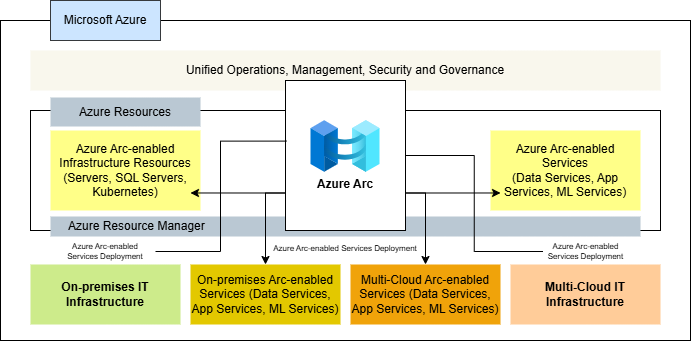
Azure Arc is a solution that bridges the gap between on-premises, edge, and multi-cloud environments, allowing businesses to manage, govern, and secure their infrastructure effectively.

Ireland | Bobby Abuchi