
PowerShell is a handy tool for automating tasks and managing configuration.
PowerShell is not limited to Windows devices, it is cross-platform.
To get started with PowerShell in windows PC, open Windows PowerShell in your windows PC or launch PowerShell from VSCode terminal.
Run the command $PSVersionTable and $PSVersionTable.PSVersion for details of your version of PowerShell.
Searching PowerShell Command
You can view and search list of commands available in PowerShell with Get-Command. To search commands, eg. User related commands, running Get-Command -Noun Disk* will list Disk related commands. The (*) will ensure that all commands with Disk keyword are listed.
You can narrow your search by specifying the verb as well. Eg. Get-Command -Verb Get -Noun Disk*. Running Get-Command -Verb Get will list all the commandlets with the Get verb.
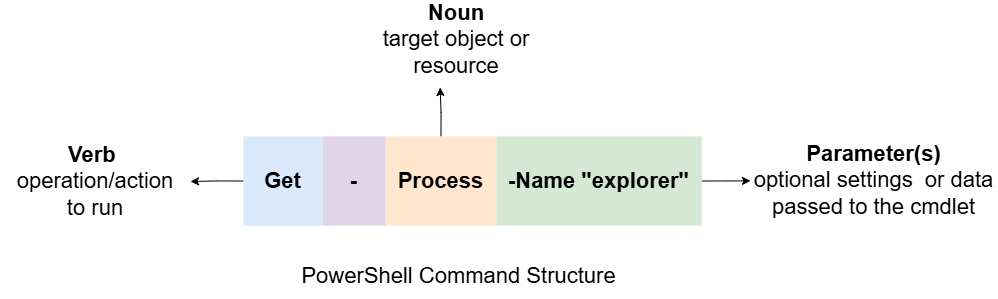
PowerShell Command Structure
PowerShell commands follow a consistent structure, below a break down.
-
Cmdlets (Commandlets): these are fundamental building blocks in PowerShell. They consist of Verb, Noun and Parameters (also referred to as Flags).
-
Aliases: these are shorthand names for cmdlets or other elements. They allow you to use shorter forms of commands. Example:
lsforGet-ChildItem,cdforSet-Location. -
Functions: Custom scripts that perform specific tasks